Genesis MedTech AI-Assisted Surgical Video Platform
Genesis MedTech is a global medical device company serving 400+ U.S. hospitals. Partnering with 2 PMs and a team of 6 developers, I designed an all-in-one platform that lets surgeons upload and edit operative videos with AI assistance — reaching 85% surgeon satisfaction on upload and a 68% editing retention rate at MVP (vs. 60% benchmark).
The Solution
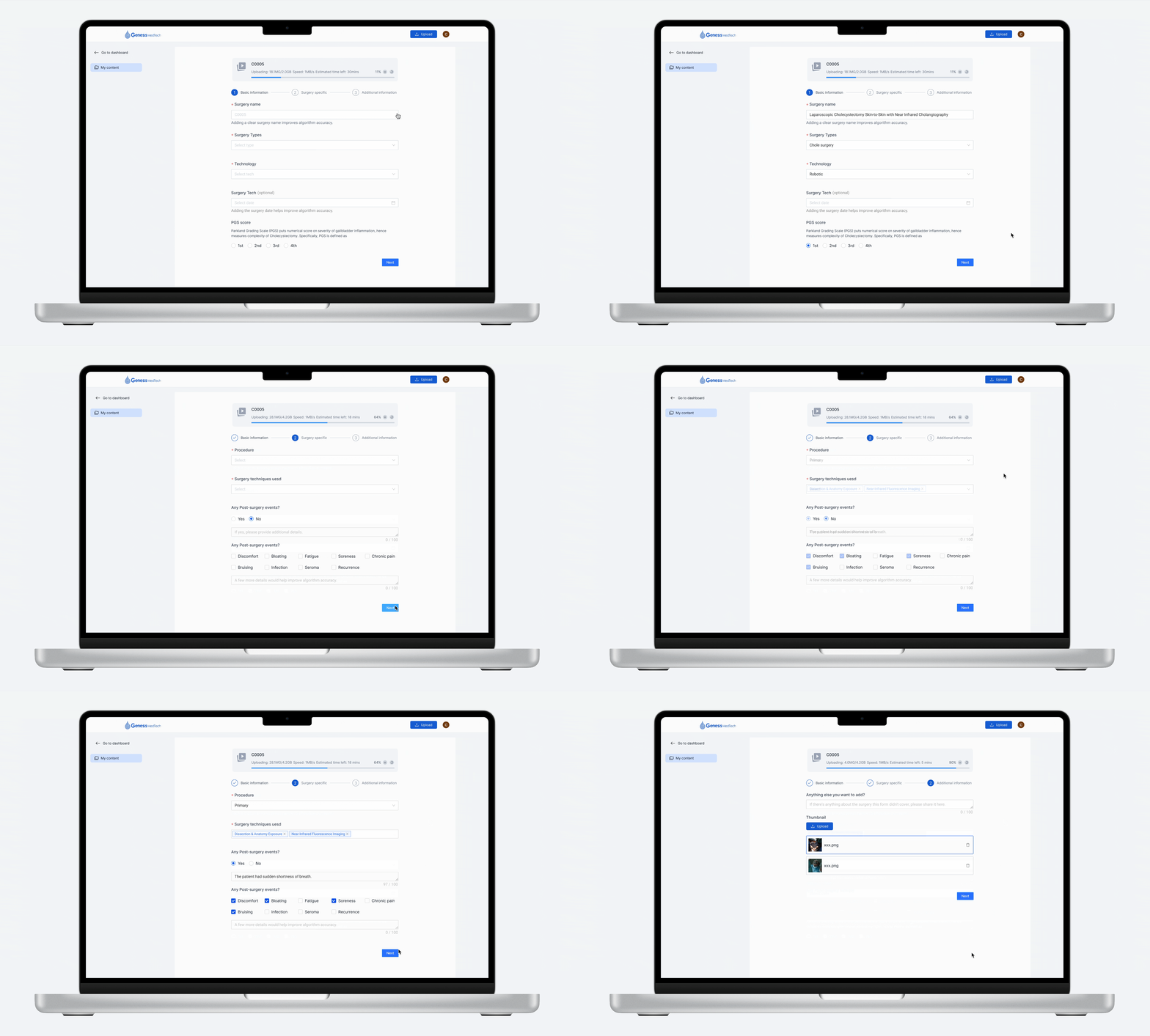
Uploading Process
A guided upload with AI-prefilled surgery descriptions and automated flagging of patient-identifiable frames.
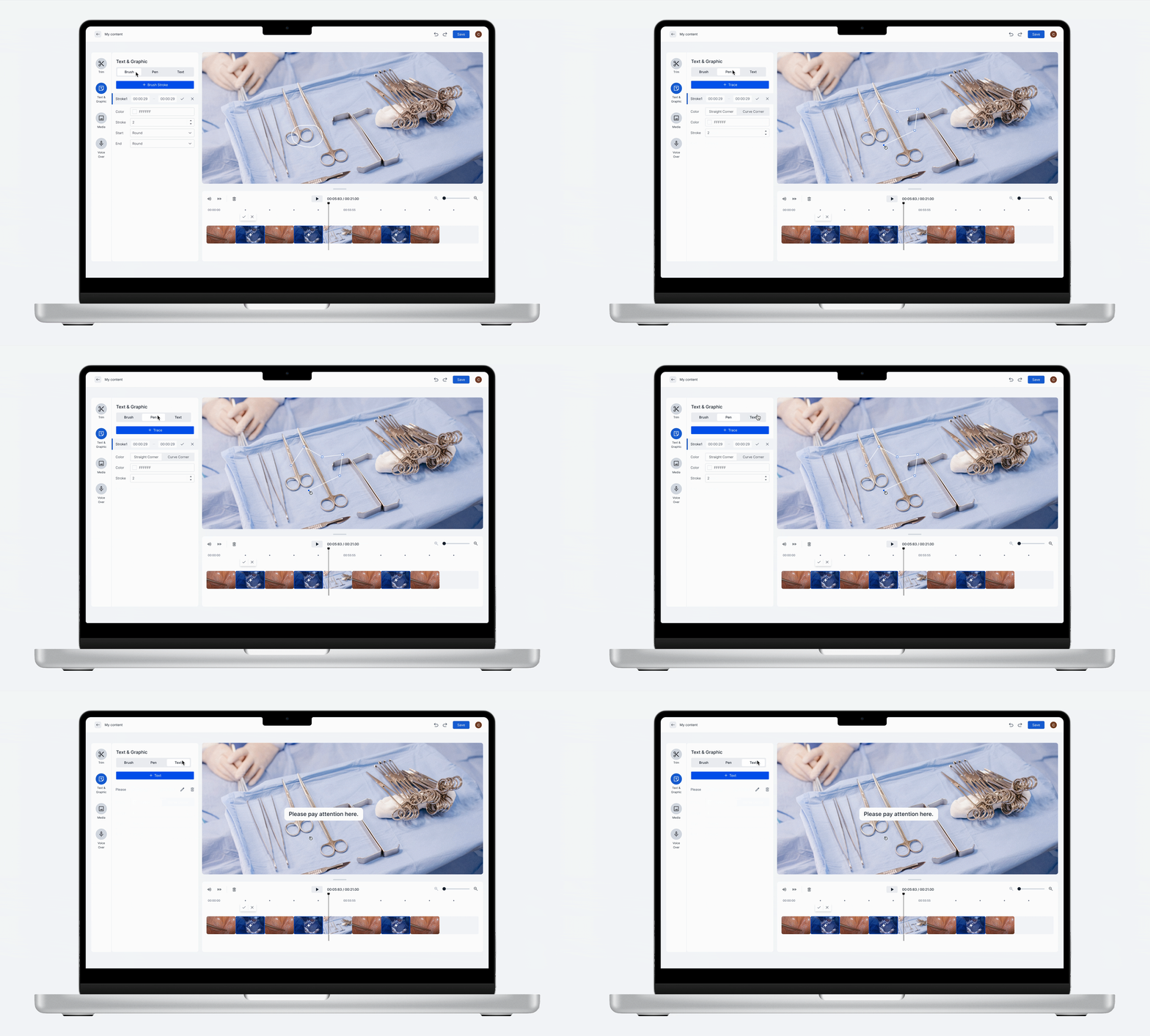
AI-assisted editor
AI-assisted editor that surfaces unusable and sensitive clips for surgeon review before publishing.
The Problem
Leading surgeons publish operative videos on platforms like YouTube — to reflect on their own procedures and help younger doctors learn. But mainstream platforms fail them: surgical footage gets misclassified as graphic content and removed, and limited editing tools force surgeons into separate software to finish their videos.

Outcomes & Impact
For surgeons, the tool achieved the goals:
- 7.5Customer Effect ScoreOutperforms industry standard
- 15%Trim down timeAllow users to edit efficiently
- 8.5NPS ScoreOutperforms initial goal of 7.5
For Genesis MedTech, the product achieved the goals:
- 85%Surgeon satisfactionDuring uploading process
- 68%Editing retention rateOutperforms initial goal of 60%
- 81%AI success rateOutperforms initial goal of 75%
Deep Dive: Process, Iterations, and Trade-offs
Upload flow — processing page vs. direct-to-editor
I mapped two navigation directions and ran a comparative usability study. The version showing a processing state before the editor scored 89% usability, better matching users' mental models.


Stepped input, driven by user confidence
Research showed surgeons don't mind manual data entry — they mind re-entering data that already lives in hospital systems. Testing a 3-step form against a single-screen form, users preferred the stepped version because breaking up the task built confidence. This insight also shaped our push to auto-populate post-surgery data from partner hospitals (10+ onboarded so far).


Advocating legal disclosures through evidence
Legal wanted dense disclosures on the upload page. Rather than push back directly, I mocked it up and tested with surgeons; the results showed the text was overwhelming, and I successfully proposed moving it to a separate static page so users could stay focused.

Helping surgeons save time and mental effort on editing
For the AI-integrated one-click editing, I collaborated with the AI engineering team to understand current strengths and technical limitations. Internal data set the range we designed for — the longest surgery video ran 36 hours, with a median length of 3 hours — so we designed for edge cases to improve inclusivity, reliability, and usability for all users.
Sensitive-clip UI — clarity over alarm
For AI-flagged sensitive frames, I tested a cautionary orange treatment against a neutral, on-brand blue with plain-language copy. Surgeons — being highly educated and prone to over-reading UI — strongly preferred the calmer version, which scored significantly higher. We paired this with a “confirm deletions” pattern (over grayed-out restores) that users found clearer and more controllable.


Usability testing on the AI editing feature
We designed quick-access entry points for common editing tools. We conducted mid-fidelity usability testing to ensure users could easily find and use each editing feature. All key tools met user expectations.

Scoping with trade-offs
Using an NN/g-based trade-off framework weighing user value against budget and timeline, the team scored features through structured voting. The Pen Tool ranked lowest (7.5) — still “desired,” but deferred from the 2025 roadmap to protect MVP focus.

Next steps
Post-launch: listen, iterate, expand.
We collected real feedback from pilot users and realized the model's outputs were basic — but users said ~80% of their surgeries are routine, and they'd still use the AI-generated text as a starting point. We decided to continue refining the AI pre-fill feature and monitor engagement post-release.

Validated demand, real integrations underway.
Users want post-surgery data to auto-populate the form, so we confirmed technical feasibility with the dev lead and secured legal and data-sharing approvals with partner hospitals. We've onboarded 10+ affiliate hospitals so far and are actively expanding integration coverage.

Lessons Learned
Designing for surgeons taught me that expertise changes how people read an interface. Highly educated users over-analyzed our UI copy and found cautionary visuals alarming — so clarity and calm outperformed “helpful” emphasis at every turn. I also learned to advocate through evidence, not opinion: when Legal pushed for dense on-page disclosures, a quick mockup and user test moved the decision faster than any argument could. Most of all, I saw that in high-stakes domains, earning user trust isn’t a final polish — it’s the design constraint that shapes every flow.